User guide for Reports → Call: filters, call table columns, search, and export.
📞 Call Report (Reports → Call)
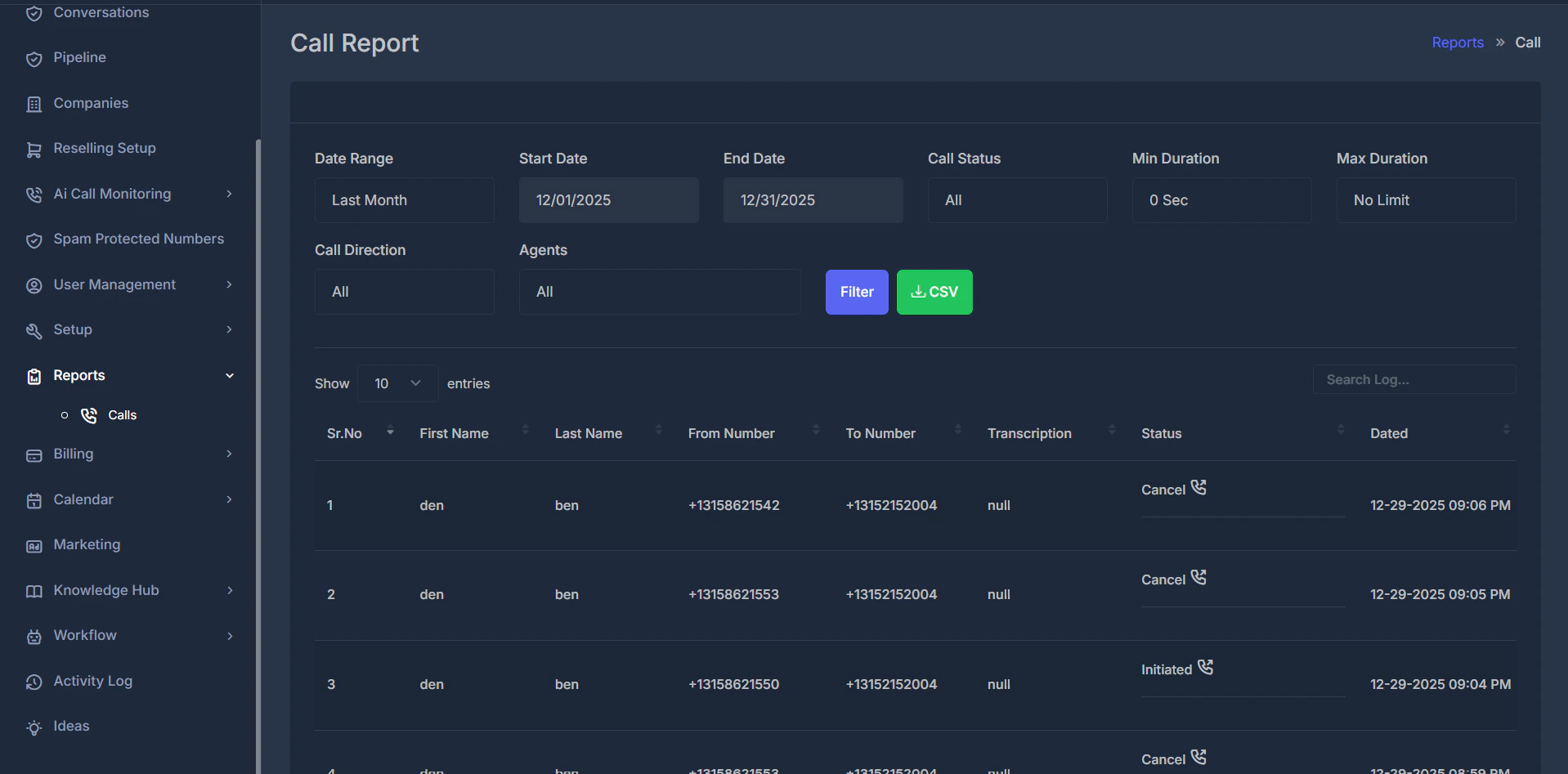
The Call option under Reports is where you review phone calls for your organization: who was involved, numbers, outcomes, length, and when each call happened. Everything below is about that Call report only.👀 What you see herePhone calls show in a table—one row per call. The table updates when you change filters and apply them, or when you change the date range (where that refreshes on its own).At the top you pick which time range and which calls matter. Each row below is one call that matches those choices.
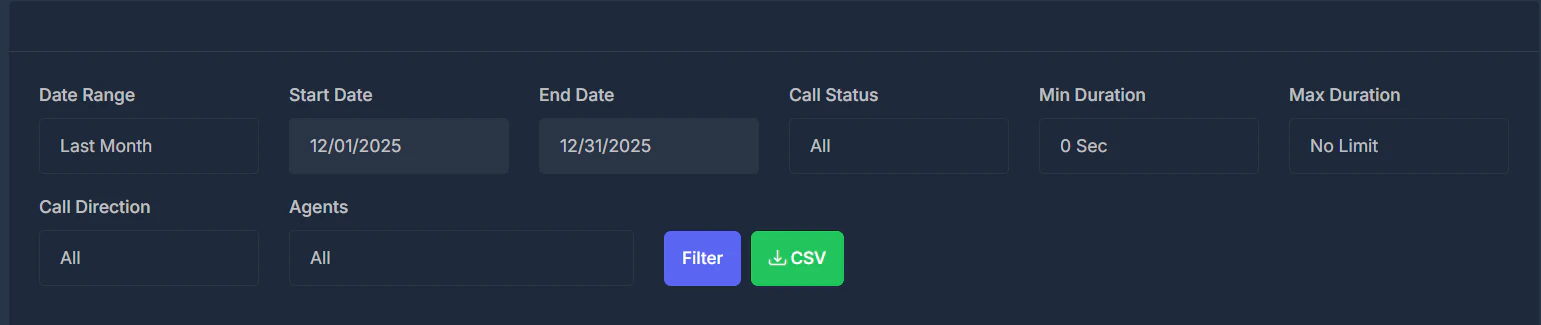
🛠️ Filters
🗓️ Date rangeControls how Start Date and End Date are filled:
Custom dates — You enter Start Date and End Date yourself; those fields are editable.
Presets (Today, Yesterday, This week, Last 7 days, This month, Last month, and similar) — The dates are set for you and stay fixed for that preset.
If you are not on custom dates, changing the date range refreshes the calls shown. On custom dates, set start and end, then use Filter (or another control that refreshes).Call times use your account time zone, so “today” matches your local calendar day.📅 Start date and end dateWork with Date range. They set the from–to window for calls in the table. Editable only when Custom dates is selected.✅ Call statusLimits calls to one outcome, or shows all outcomes:
All — Every outcome.
Answered, Completed, Busy, No-answer, Failed, Missed Call, Cancel — Only calls with that outcome.
Pick a value and apply it (for example Filter, or change the date range where it auto-refreshes).⏱️ Minimum durationKeeps calls whose length is at least what you select (from zero up to two hours). Shorter calls are hidden—useful when you only care about calls that ran long enough.⏳ Maximum durationOptional upper cap on length:
No limit — No maximum.
Any other value — Callslonger than that are excluded.
Together with minimum duration, you can focus on calls in a certain length range.🔄 Call direction
All — Incoming and outgoing calls.
Inbound — Calls you received.
Outbound — Calls you placed.
👤 AgentsShows calls for one person, or—where the menu includes it—everyone (All). The names are people who can place or receive calls in your setup.If the team is not set up, you may see a single placeholder instead of names.🔎 FilterApplies your choices and reloads the call table. Use it after changing something that does not refresh by itself (for example custom start and end dates).💾 Download (export)Saves a spreadsheet file using the same choices as the Call Report (dates, status, duration limits, direction, agent). Pick a wide date range to download your whole call history; large downloads take a little longer but are not cut short.Each row has: date, first and last name, from and to numbers, direction, status, outcome (for example Connected, Voicemail, Screened), duration, talk seconds, who answered, a recording link, and the call’s summary and full transcript. It opens cleanly in Excel and Google Sheets.
Coaching tip: filter to one rep and a week, download, and read the transcripts of their longest calls first. That is where the objections and the wins are.
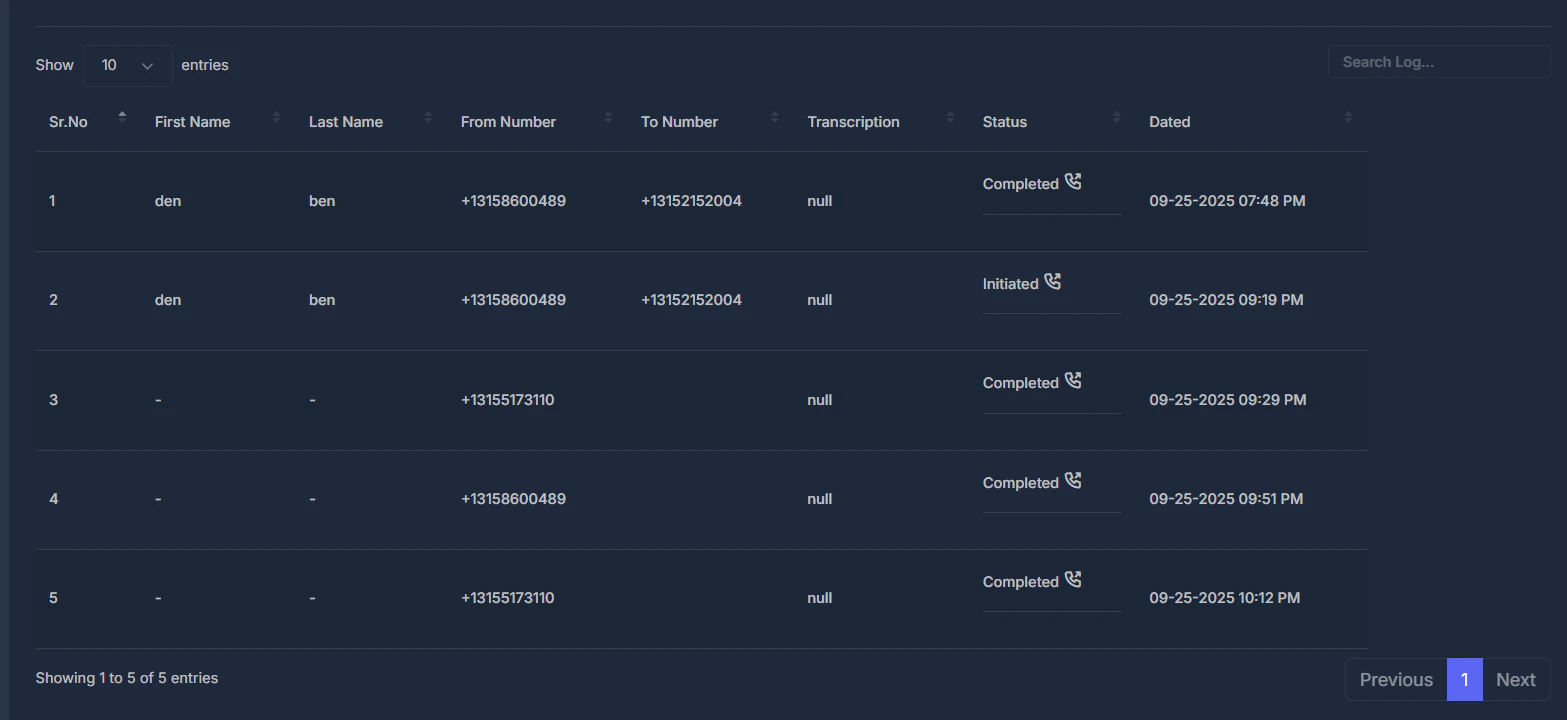
📋 What each column means (calls)
#️⃣ Sr. No.A reference number for the row. Newer calls appear higher up.🧑 First name / Last nameThe contact linked to that call, when known. A dash means the name was not available.📞 From numberWhere the call came from (caller side).☎️ To numberWhere the call went (destination).🎧 Recording & TranscriptWhat the call left behind:
A one-line summary of the conversation, when there is one.
A Recording button when the call was recorded.
A Transcript button when the conversation was transcribed.
Either button opens the call in a window with the summary, an audio player and the full transcript. Use Copy to paste the transcript into coaching notes. Reps see only their own calls; managers see their team; owners see everyone.
Transcripts are saved for calls from 25 September 2026 onward. Earlier calls
have recordings but no transcript, because the words were never stored.
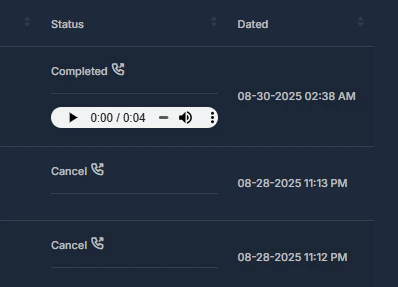
🏷️ StatusHow the call ended, plus:
A small incoming or outgoing marker for quick direction.
For completed calls with a recording, a player so you can listen without leaving the Call Report.
🗓️ DatedWhen that call was logged, in your time zone.
🆕 What changed recently
Recordings and transcripts
Every answered call now keeps its transcript and a short summary, saved by
the phone system itself when the call ends, so nothing depends on the rep’s
browser staying open.Read them here. The old Transcription column showed text messages, which
are empty on calls. It is now Recording & Transcript, with a viewer for
each call.Download your full history. The export now includes outcome, talk time,
the summary and the full transcript, and it no longer stops on large date
ranges.Recordings go to GoHighLevel. If GoHighLevel is connected, each call’s
recording now appears on the call in the contact’s GoHighLevel conversation.
{"docsConfig":{"theme":"mint","$schema":"https://rizzdial.com/docs.json","name":"Docs AI Sync","colors":{"primary":"#3971dd","light":"#07C983","dark":"#15803D"},"logo":{"light":"https://mintcdn.com/rizler/MwcZdPkhJvH5fJqM/logo/favicon-dark.png?fit=max\u0026auto=format\u0026n=MwcZdPkhJvH5fJqM\u0026q=85\u0026s=26780880a5a9dd3ace328576d44a36a9","dark":"https://mintcdn.com/rizler/MwcZdPkhJvH5fJqM/logo/favicon-light.png?fit=max\u0026auto=format\u0026n=MwcZdPkhJvH5fJqM\u0026q=85\u0026s=fcb04acbfe06a2c9fa0763f8e1a94102"},"favicon":"https://mintcdn.com/rizler/biOOGUI2wEQd0bTU/favicon-removebg-preview.png?fit=max\u0026auto=format\u0026n=biOOGUI2wEQd0bTU\u0026q=85\u0026s=987835b1e6110d9c3e3619c315053bec","navbar":{"links":[{"href":"mailto:support@rizler.ai","label":"Support"}],"primary":{"type":"button","label":"Dashboard","href":"https://app.rizzdial.com/"}},"footer":{"socials":{"x":"https://app.rizzdial.com/","github":"https://app.rizzdial.com/","linkedin":"https://app.rizzdial.com/"}},"styling":{"latex":true},"navigation":{"global":{"anchors":[{"anchor":"Community","icon":"slack","href":"https://www.skool.com/evolving-ai-hub/about?ref=e1c2ca4f514546b38823baafdd6e6566"}]},"pages":[]}},"deployment":{"deploymentMetadataValue":{"subdomain":"rizler","hasAudioNarration":false,"actualSubdomain":"rizler","customDomains":["docs-old.aisync.link"],"gitSource":{"type":"github","owner":"rizlerai","repo":"docs","deployBranch":"main","contentDirectory":"","isPrivate":false,"mountPath":"","label":""},"entitlements":{},"buildId":"6ae147a0014eaadf064d5fb9","clientVersion":"0.0.4340","searchFilterCounts":[{"language":"default","tag":"Documentation","count":111},{"language":"default","tag":"Dialer","count":19},{"language":"default","tag":"Artificial Intelligence","count":16},{"language":"default","tag":"AI Agents","count":15},{"language":"default","tag":"Manage","count":13},{"language":"default","tag":"API Reference","count":9},{"language":"default","tag":"Settings","count":9},{"language":"default","tag":"Edit/Manage Agent","count":7},{"language":"default","tag":"Go Live","count":7},{"language":"default","tag":"Working with AI Agents","count":6}]},"assistantConfig":{},"basePath":"","hasChatPermissions":false,"hasWebMcpPermissions":false,"toggles":[{"name":"kill-isr","enabled":true,"variant":{"name":"disabled","enabled":false,"feature_enabled":true},"impressionData":false},{"name":"custom-rbac-roles","enabled":true,"variant":{"name":"disabled","enabled":false,"feature_enabled":true},"impressionData":false},{"name":"agent-mintlify-slack","enabled":true,"variant":{"name":"disabled","enabled":false,"feature_enabled":true},"impressionData":false},{"name":"agent-integrations-settings","enabled":true,"variant":{"name":"disabled","enabled":false,"feature_enabled":true},"impressionData":false},{"name":"rbac-expansion","enabled":true,"variant":{"name":"disabled","enabled":false,"feature_enabled":true},"impressionData":false},{"name":"automations-pr-grouping","enabled":true,"variant":{"name":"disabled","enabled":false,"feature_enabled":true},"impressionData":false},{"name":"custom-prefix","enabled":true,"variant":{"name":"disabled","enabled":false,"feature_enabled":true},"impressionData":false},{"name":"analytics-v7","enabled":true,"variant":{"name":"disabled","enabled":false,"feature_enabled":true},"impressionData":false},{"name":"user-flows-analytics","enabled":true,"variant":{"name":"disabled","enabled":false,"feature_enabled":true},"impressionData":false},{"name":"no-publish-flow","enabled":true,"variant":{"name":"disabled","enabled":false,"feature_enabled":true},"impressionData":false},{"name":"snapshot-serving-live","enabled":true,"variant":{"name":"disabled","enabled":false,"feature_enabled":true},"impressionData":false},{"name":"stripTemperatureMiddleware","enabled":true,"variant":{"name":"disabled","enabled":false,"feature_enabled":true},"impressionData":false},{"name":"support-platform-pylon-zendesk","enabled":true,"variant":{"name":"disabled","enabled":false,"feature_enabled":true},"impressionData":false},{"name":"snapshot-serving","enabled":true,"variant":{"name":"disabled","enabled":false,"feature_enabled":true},"impressionData":false},{"name":"instant-rollback","enabled":true,"variant":{"name":"disabled","enabled":false,"feature_enabled":true},"impressionData":false},{"name":"granular-notifications-server","enabled":true,"variant":{"name":"disabled","enabled":false,"feature_enabled":true},"impressionData":false},{"name":"granular-notifications","enabled":true,"variant":{"name":"disabled","enabled":false,"feature_enabled":true},"impressionData":false},{"name":"automations-fable","enabled":true,"variant":{"name":"disabled","enabled":false,"feature_enabled":true},"impressionData":false},{"name":"fixed-ai-action-pricing","enabled":true,"variant":{"name":"disabled","enabled":false,"feature_enabled":true},"impressionData":false},{"name":"site-roles","enabled":true,"variant":{"name":"disabled","enabled":false,"feature_enabled":true},"impressionData":false},{"name":"automation-resolve-merge-conflict","enabled":true,"variant":{"name":"disabled","enabled":false,"feature_enabled":true},"impressionData":false},{"name":"scoped-publishing","enabled":true,"variant":{"name":"disabled","enabled":false,"feature_enabled":true},"impressionData":false},{"name":"mintql","enabled":true,"variant":{"name":"disabled","enabled":false,"feature_enabled":true},"impressionData":false},{"name":"page-level-analytics","enabled":true,"variant":{"name":"disabled","enabled":false,"feature_enabled":true},"impressionData":false},{"name":"editor-version-history-v2","enabled":true,"variant":{"name":"disabled","enabled":false,"feature_enabled":true},"impressionData":false},{"name":"billing-page-v2","enabled":true,"variant":{"name":"disabled","enabled":false,"feature_enabled":true},"impressionData":false},{"name":"full-page-search","enabled":true,"variant":{"name":"disabled","enabled":false,"feature_enabled":true},"impressionData":false},{"name":"workspace-projects","enabled":true,"variant":{"name":"disabled","enabled":false,"feature_enabled":true},"impressionData":false},{"name":"fork-pr-previews","enabled":true,"variant":{"name":"disabled","enabled":false,"feature_enabled":true},"impressionData":false},{"name":"revalidation-jwt","enabled":true,"variant":{"name":"disabled","enabled":false,"feature_enabled":true},"impressionData":false},{"name":"hobby-abuse-scan","enabled":true,"variant":{"name":"disabled","enabled":false,"feature_enabled":true},"impressionData":false},{"name":"dashboard-inbox","enabled":true,"variant":{"name":"disabled","enabled":false,"feature_enabled":true},"impressionData":false},{"name":"turbopuffer-dual-write","enabled":true,"variant":{"name":"disabled","enabled":false,"feature_enabled":true},"impressionData":false},{"name":"approve-review-flow","enabled":true,"variant":{"name":"disabled","enabled":false,"feature_enabled":true},"impressionData":false},{"name":"editor-metadata","enabled":true,"variant":{"name":"disabled","enabled":false,"feature_enabled":true},"impressionData":false},{"name":"turbopuffer-serve","enabled":true,"variant":{"name":"disabled","enabled":false,"feature_enabled":true},"impressionData":false},{"name":"live-agents","enabled":true,"variant":{"name":"disabled","enabled":false,"feature_enabled":true},"impressionData":false},{"name":"starter-pricing","enabled":true,"variant":{"name":"treatment","enabled":true,"payload":{"type":"string","value":"treatment"},"feature_enabled":true},"impressionData":false},{"name":"llms-txt-v2","enabled":true,"variant":{"name":"disabled","enabled":false,"feature_enabled":true},"impressionData":false},{"name":"wildcard-email-auth","enabled":true,"variant":{"name":"disabled","enabled":false,"feature_enabled":true},"impressionData":false}],"starterQuestions":[],"googleFontsInlined":false},"customCss":[]}
{"page":{"pagePath":"reports/calls","slug":"/reports/calls","pageMetadata":{"title":"Call Reports","description":"User guide for Reports → Call: filters, call table columns, search, and export.","icon":"phone","href":"/reports/calls"},"description":{"compiledSource":"\"use strict\";\nconst {jsx: _jsx} = arguments[0];\nconst {useMDXComponents: _provideComponents} = arguments[0];\nfunction _createMdxContent(props) {\n const _components = {\n p: \"p\",\n ..._provideComponents(),\n ...props.components\n };\n return _jsx(_components.p, {\n children: \"User guide for Reports → Call: filters, call table columns, search, and export.\"\n });\n}\nfunction MDXContent(props = {}) {\n const {wrapper: MDXLayout} = {\n ..._provideComponents(),\n ...props.components\n };\n return MDXLayout ? _jsx(MDXLayout, {\n ...props,\n children: _jsx(_createMdxContent, {\n ...props\n })\n }) : _createMdxContent(props);\n}\nreturn {\n default: MDXContent\n};\n","frontmatter":{},"scope":{}},"pageType":"default","mdx":{"mdxSource":{"compiledSource":"\"use strict\";const{Fragment:_Fragment,jsx:_jsx,jsxs:_jsxs}=arguments[0];const{useMDXComponents:_provideComponents}=arguments[0];function _createMdxContent(props){const _components={a:`a`,em:`em`,li:`li`,p:`p`,strong:`strong`,ul:`ul`,..._provideComponents(),...props.components},{Heading,Note,OptimizedImage,Tip,Update}=_components;if(!Heading)_missingMdxReference(`Heading`,true);if(!Note)_missingMdxReference(`Note`,true);if(!OptimizedImage)_missingMdxReference(`OptimizedImage`,true);if(!Tip)_missingMdxReference(`Tip`,true);if(!Update)_missingMdxReference(`Update`,true);return _jsxs(_Fragment,{children:[_jsx(Heading,{level:`1`,id:`-call-report-reports-→-call`,children:`📞 Call Report (Reports → Call)`}),`\n`,_jsxs(_components.p,{children:[`The `,_jsx(_components.strong,{children:`Call`}),` option under `,_jsx(_components.strong,{children:`Reports`}),` is where you review `,_jsx(_components.strong,{children:`phone calls`}),` for your organization: who was involved, numbers, outcomes, length, and when each call happened. Everything below is about that `,_jsx(_components.strong,{children:`Call`}),` report only.`]}),`\n`,_jsx(OptimizedImage,{src:`https://mintcdn.com/rizler/qfIPW4E7Ajy_Ilf2/images/reports/call/overview.png?fit=max\u0026auto=format\u0026n=qfIPW4E7Ajy_Ilf2\u0026q=85\u0026s=e994c9c286523dca0892960969d26b99`,alt:`Call report table and filters`,className:`mint-rounded-lg mint-border mint-shadow-sm`,\"data-og-width\":`1918`,width:`1918`,\"data-og-height\":`947`,height:`947`,\"data-path\":`images/reports/call/overview.png`,\"data-optimize\":`true`,\"data-opv\":`3`,srcset:`https://mintcdn.com/rizler/qfIPW4E7Ajy_Ilf2/images/reports/call/overview.png?w=280\u0026fit=max\u0026auto=format\u0026n=qfIPW4E7Ajy_Ilf2\u0026q=85\u0026s=437773d385681627412684e4a2e1e9fb 280w, https://mintcdn.com/rizler/qfIPW4E7Ajy_Ilf2/images/reports/call/overview.png?w=560\u0026fit=max\u0026auto=format\u0026n=qfIPW4E7Ajy_Ilf2\u0026q=85\u0026s=6f8247baa628ed4bc5affa1742b8ff13 560w, https://mintcdn.com/rizler/qfIPW4E7Ajy_Ilf2/images/reports/call/overview.png?w=840\u0026fit=max\u0026auto=format\u0026n=qfIPW4E7Ajy_Ilf2\u0026q=85\u0026s=e7fecd3e3ee45770a73cfc3cd2a23ec3 840w, https://mintcdn.com/rizler/qfIPW4E7Ajy_Ilf2/images/reports/call/overview.png?w=1100\u0026fit=max\u0026auto=format\u0026n=qfIPW4E7Ajy_Ilf2\u0026q=85\u0026s=8fc24f2516915637a0618e84b597b5ed 1100w, https://mintcdn.com/rizler/qfIPW4E7Ajy_Ilf2/images/reports/call/overview.png?w=1650\u0026fit=max\u0026auto=format\u0026n=qfIPW4E7Ajy_Ilf2\u0026q=85\u0026s=88f378c47b14d661c50f22d1d636c844 1650w, https://mintcdn.com/rizler/qfIPW4E7Ajy_Ilf2/images/reports/call/overview.png?w=2500\u0026fit=max\u0026auto=format\u0026n=qfIPW4E7Ajy_Ilf2\u0026q=85\u0026s=c6314c46a00eb2f4f11fe0ec8c6dfb43 2500w`}),`\n`,_jsx(_components.p,{children:_jsx(_components.strong,{children:`👀 What you see here`})}),`\n`,_jsxs(_components.p,{children:[_jsx(_components.strong,{children:`Phone calls`}),` show in a table—`,_jsx(_components.strong,{children:`one row per call`}),`. The table updates when you change filters and apply them, or when you change the date range (where that refreshes on its own).`]}),`\n`,_jsxs(_components.p,{children:[`At the top you pick `,_jsx(_components.strong,{children:`which time range`}),` and `,_jsx(_components.strong,{children:`which calls`}),` matter. Each row below is `,_jsx(_components.strong,{children:`one call`}),` that matches those choices.`]}),`\n`,_jsx(Heading,{level:`2`,id:`-filters`,children:`🛠️ Filters`}),`\n`,_jsx(OptimizedImage,{src:`https://mintcdn.com/rizler/qfIPW4E7Ajy_Ilf2/images/reports/call/filters.png?fit=max\u0026auto=format\u0026n=qfIPW4E7Ajy_Ilf2\u0026q=85\u0026s=1984fd60e84236e0429d68d5cbf0aad0`,alt:`Call report filter controls`,className:`mint-rounded-lg mint-border mint-shadow-sm`,\"data-og-width\":`1541`,width:`1541`,\"data-og-height\":`325`,height:`325`,\"data-path\":`images/reports/call/filters.png`,\"data-optimize\":`true`,\"data-opv\":`3`,srcset:`https://mintcdn.com/rizler/qfIPW4E7Ajy_Ilf2/images/reports/call/filters.png?w=280\u0026fit=max\u0026auto=format\u0026n=qfIPW4E7Ajy_Ilf2\u0026q=85\u0026s=020cb5006ef8f9301fc28f3cc1ee343c 280w, https://mintcdn.com/rizler/qfIPW4E7Ajy_Ilf2/images/reports/call/filters.png?w=560\u0026fit=max\u0026auto=format\u0026n=qfIPW4E7Ajy_Ilf2\u0026q=85\u0026s=30210aec84e5ea301efcccf6aeb9b386 560w, https://mintcdn.com/rizler/qfIPW4E7Ajy_Ilf2/images/reports/call/filters.png?w=840\u0026fit=max\u0026auto=format\u0026n=qfIPW4E7Ajy_Ilf2\u0026q=85\u0026s=b02676dfeada6db97da7ac4195d73be5 840w, https://mintcdn.com/rizler/qfIPW4E7Ajy_Ilf2/images/reports/call/filters.png?w=1100\u0026fit=max\u0026auto=format\u0026n=qfIPW4E7Ajy_Ilf2\u0026q=85\u0026s=9e9430d6b959034e31a2fb81ac129863 1100w, https://mintcdn.com/rizler/qfIPW4E7Ajy_Ilf2/images/reports/call/filters.png?w=1650\u0026fit=max\u0026auto=format\u0026n=qfIPW4E7Ajy_Ilf2\u0026q=85\u0026s=5496fef3bac2fdfce04af03034e6dc75 1650w, https://mintcdn.com/rizler/qfIPW4E7Ajy_Ilf2/images/reports/call/filters.png?w=2500\u0026fit=max\u0026auto=format\u0026n=qfIPW4E7Ajy_Ilf2\u0026q=85\u0026s=dc529cfa53920bf1200d8a82a03ed2d0 2500w`}),`\n`,_jsx(_components.p,{children:_jsx(_components.strong,{children:`🗓️ Date range`})}),`\n`,_jsxs(_components.p,{children:[`Controls how `,_jsx(_components.strong,{children:`Start Date`}),` and `,_jsx(_components.strong,{children:`End Date`}),` are filled:`]}),`\n`,_jsxs(_components.ul,{children:[`\n`,_jsxs(_components.li,{children:[_jsx(_components.strong,{children:`Custom dates`}),` — You enter `,_jsx(_components.strong,{children:`Start Date`}),` and `,_jsx(_components.strong,{children:`End Date`}),` yourself; those fields are editable.`]}),`\n`,_jsxs(_components.li,{children:[_jsx(_components.strong,{children:`Presets`}),` (`,_jsx(_components.em,{children:`Today`}),`, `,_jsx(_components.em,{children:`Yesterday`}),`, `,_jsx(_components.em,{children:`This week`}),`, `,_jsx(_components.em,{children:`Last 7 days`}),`, `,_jsx(_components.em,{children:`This month`}),`, `,_jsx(_components.em,{children:`Last month`}),`, and similar) — The dates are set for you and stay fixed for that preset.`]}),`\n`]}),`\n`,_jsxs(_components.p,{children:[`If you are `,_jsx(_components.strong,{children:`not`}),` on custom dates, changing the date range refreshes the `,_jsx(_components.strong,{children:`calls`}),` shown. On `,_jsx(_components.strong,{children:`custom dates`}),`, set start and end, then use `,_jsx(_components.strong,{children:`Filter`}),` (or another control that refreshes).`]}),`\n`,_jsxs(_components.p,{children:[`Call times use `,_jsx(_components.strong,{children:`your account time zone`}),`, so “today” matches your local calendar day.`]}),`\n`,_jsx(_components.p,{children:_jsx(_components.strong,{children:`📅 Start date and end date`})}),`\n`,_jsxs(_components.p,{children:[`Work with `,_jsx(_components.strong,{children:`Date range`}),`. They set the `,_jsx(_components.strong,{children:`from–to`}),` window for `,_jsx(_components.strong,{children:`calls`}),` in the table. Editable only when `,_jsx(_components.strong,{children:`Custom dates`}),` is selected.`]}),`\n`,_jsx(_components.p,{children:_jsx(_components.strong,{children:`✅ Call status`})}),`\n`,_jsxs(_components.p,{children:[`Limits `,_jsx(_components.strong,{children:`calls`}),` to one outcome, or shows `,_jsx(_components.strong,{children:`all`}),` outcomes:`]}),`\n`,_jsxs(_components.ul,{children:[`\n`,_jsxs(_components.li,{children:[_jsx(_components.strong,{children:`All`}),` — Every outcome.`]}),`\n`,_jsxs(_components.li,{children:[_jsx(_components.strong,{children:`Answered`}),`, `,_jsx(_components.strong,{children:`Completed`}),`, `,_jsx(_components.strong,{children:`Busy`}),`, `,_jsx(_components.strong,{children:`No-answer`}),`, `,_jsx(_components.strong,{children:`Failed`}),`, `,_jsx(_components.strong,{children:`Missed Call`}),`, `,_jsx(_components.strong,{children:`Cancel`}),` — Only `,_jsx(_components.strong,{children:`calls`}),` with that outcome.`]}),`\n`]}),`\n`,_jsxs(_components.p,{children:[`Pick a value and apply it (for example `,_jsx(_components.strong,{children:`Filter`}),`, or change the date range where it auto-refreshes).`]}),`\n`,_jsx(_components.p,{children:_jsx(_components.strong,{children:`⏱️ Minimum duration`})}),`\n`,_jsxs(_components.p,{children:[`Keeps `,_jsx(_components.strong,{children:`calls`}),` whose `,_jsx(_components.strong,{children:`length`}),` is `,_jsx(_components.strong,{children:`at least`}),` what you select (from zero up to two hours). Shorter `,_jsx(_components.strong,{children:`calls`}),` are hidden—useful when you only care about `,_jsx(_components.strong,{children:`calls`}),` that ran long enough.`]}),`\n`,_jsx(_components.p,{children:_jsx(_components.strong,{children:`⏳ Maximum duration`})}),`\n`,_jsx(_components.p,{children:`Optional upper cap on length:`}),`\n`,_jsxs(_components.ul,{children:[`\n`,_jsxs(_components.li,{children:[_jsx(_components.strong,{children:`No limit`}),` — No maximum.`]}),`\n`,_jsxs(_components.li,{children:[`Any other value — `,_jsx(_components.strong,{children:`Calls`}),` `,_jsx(_components.strong,{children:`longer`}),` than that are excluded.`]}),`\n`]}),`\n`,_jsxs(_components.p,{children:[`Together with minimum duration, you can focus on `,_jsx(_components.strong,{children:`calls`}),` in a certain length range.`]}),`\n`,_jsx(_components.p,{children:_jsx(_components.strong,{children:`🔄 Call direction`})}),`\n`,_jsxs(_components.ul,{children:[`\n`,_jsxs(_components.li,{children:[_jsx(_components.strong,{children:`All`}),` — Incoming and outgoing `,_jsx(_components.strong,{children:`calls`}),`.`]}),`\n`,_jsxs(_components.li,{children:[_jsx(_components.strong,{children:`Inbound`}),` — `,_jsx(_components.strong,{children:`Calls`}),` you received.`]}),`\n`,_jsxs(_components.li,{children:[_jsx(_components.strong,{children:`Outbound`}),` — `,_jsx(_components.strong,{children:`Calls`}),` you placed.`]}),`\n`]}),`\n`,_jsx(_components.p,{children:_jsx(_components.strong,{children:`👤 Agents`})}),`\n`,_jsxs(_components.p,{children:[`Shows `,_jsx(_components.strong,{children:`calls`}),` for `,_jsx(_components.strong,{children:`one`}),` person, or—where the menu includes it—`,_jsx(_components.strong,{children:`everyone`}),` (`,_jsx(_components.strong,{children:`All`}),`). The names are people who can place or receive `,_jsx(_components.strong,{children:`calls`}),` in your setup.`]}),`\n`,_jsx(_components.p,{children:`If the team is not set up, you may see a single placeholder instead of names.`}),`\n`,_jsx(_components.p,{children:_jsx(_components.strong,{children:`🔎 Filter`})}),`\n`,_jsxs(_components.p,{children:[`Applies your choices and reloads the `,_jsx(_components.strong,{children:`call`}),` table. Use it after changing something that does not refresh by itself (for example `,_jsx(_components.strong,{children:`custom`}),` start and end dates).`]}),`\n`,_jsx(_components.p,{children:_jsx(_components.strong,{children:`💾 Download (export)`})}),`\n`,_jsxs(_components.p,{children:[`Saves a spreadsheet file using the `,_jsx(_components.strong,{children:`same`}),` choices as the Call Report (dates, status, duration limits, direction, agent). Pick a wide date range to download your `,_jsx(_components.strong,{children:`whole`}),` call history; large downloads take a little longer but are not cut short.`]}),`\n`,_jsxs(_components.p,{children:[`Each row has: date, first and last name, from and to numbers, direction, status, `,_jsx(_components.strong,{children:`outcome`}),` (for example `,_jsx(_components.em,{children:`Connected`}),`, `,_jsx(_components.em,{children:`Voicemail`}),`, `,_jsx(_components.em,{children:`Screened`}),`), duration, talk seconds, who answered, a recording link, and the call’s `,_jsx(_components.strong,{children:`summary`}),` and `,_jsx(_components.strong,{children:`full transcript`}),`. It opens cleanly in Excel and Google Sheets.`]}),`\n`,_jsx(Tip,{children:_jsx(_components.p,{children:`Coaching tip: filter to one rep and a week, download, and read the transcripts of their longest calls first. That is where the objections and the wins are.`})}),`\n`,_jsx(Heading,{level:`2`,id:`-what-each-column-means-calls`,children:`📋 What each column means (calls)`}),`\n`,_jsx(OptimizedImage,{src:`https://mintcdn.com/rizler/JGzkQMBzNh6jFo8w/images/reports/call/history-id.png?fit=max\u0026auto=format\u0026n=JGzkQMBzNh6jFo8w\u0026q=85\u0026s=b499cdabca33b0b866bde0716e941dac`,alt:`Call report row example`,className:`mint-rounded-lg mint-border mint-shadow-sm`,\"data-og-width\":`1567`,width:`1567`,\"data-og-height\":`720`,height:`720`,\"data-path\":`images/reports/call/history-id.png`,\"data-optimize\":`true`,\"data-opv\":`3`,srcset:`https://mintcdn.com/rizler/JGzkQMBzNh6jFo8w/images/reports/call/history-id.png?w=280\u0026fit=max\u0026auto=format\u0026n=JGzkQMBzNh6jFo8w\u0026q=85\u0026s=2d836a16ec67fafb4cb327baa2d355f5 280w, https://mintcdn.com/rizler/JGzkQMBzNh6jFo8w/images/reports/call/history-id.png?w=560\u0026fit=max\u0026auto=format\u0026n=JGzkQMBzNh6jFo8w\u0026q=85\u0026s=db33197143a068459b89ba6e4fc33681 560w, https://mintcdn.com/rizler/JGzkQMBzNh6jFo8w/images/reports/call/history-id.png?w=840\u0026fit=max\u0026auto=format\u0026n=JGzkQMBzNh6jFo8w\u0026q=85\u0026s=6eeafd2f734c1bffd972068c91bcbde5 840w, https://mintcdn.com/rizler/JGzkQMBzNh6jFo8w/images/reports/call/history-id.png?w=1100\u0026fit=max\u0026auto=format\u0026n=JGzkQMBzNh6jFo8w\u0026q=85\u0026s=bc198e07a3ef7810ec939b357bb9e5f6 1100w, https://mintcdn.com/rizler/JGzkQMBzNh6jFo8w/images/reports/call/history-id.png?w=1650\u0026fit=max\u0026auto=format\u0026n=JGzkQMBzNh6jFo8w\u0026q=85\u0026s=2b900540b9478e9d7c42247b4bff36f6 1650w, https://mintcdn.com/rizler/JGzkQMBzNh6jFo8w/images/reports/call/history-id.png?w=2500\u0026fit=max\u0026auto=format\u0026n=JGzkQMBzNh6jFo8w\u0026q=85\u0026s=70e860e5853335287a09398b2c190524 2500w`}),`\n`,_jsx(_components.p,{children:_jsx(_components.strong,{children:`#️⃣ Sr. No.`})}),`\n`,_jsx(_components.p,{children:`A reference number for the row. Newer calls appear higher up.`}),`\n`,_jsx(_components.p,{children:_jsx(_components.strong,{children:`🧑 First name / Last name`})}),`\n`,_jsxs(_components.p,{children:[`The `,_jsx(_components.strong,{children:`contact`}),` linked to that `,_jsx(_components.strong,{children:`call`}),`, when known. A dash means the name was not available.`]}),`\n`,_jsx(_components.p,{children:_jsx(_components.strong,{children:`📞 From number`})}),`\n`,_jsxs(_components.p,{children:[`Where the `,_jsx(_components.strong,{children:`call`}),` came from (caller side).`]}),`\n`,_jsx(_components.p,{children:_jsx(_components.strong,{children:`☎️ To number`})}),`\n`,_jsxs(_components.p,{children:[`Where the `,_jsx(_components.strong,{children:`call`}),` went (destination).`]}),`\n`,_jsx(_components.p,{children:_jsx(_components.strong,{children:`🎧 Recording \u0026 Transcript`})}),`\n`,_jsx(_components.p,{children:`What the call left behind:`}),`\n`,_jsxs(_components.ul,{children:[`\n`,_jsxs(_components.li,{children:[`A one-line `,_jsx(_components.strong,{children:`summary`}),` of the conversation, when there is one.`]}),`\n`,_jsxs(_components.li,{children:[`A `,_jsx(_components.strong,{children:`Recording`}),` button when the call was recorded.`]}),`\n`,_jsxs(_components.li,{children:[`A `,_jsx(_components.strong,{children:`Transcript`}),` button when the conversation was transcribed.`]}),`\n`]}),`\n`,_jsxs(_components.p,{children:[`Either button opens the call in a window with the summary, an audio player and the `,_jsx(_components.strong,{children:`full transcript`}),`. Use `,_jsx(_components.strong,{children:`Copy`}),` to paste the transcript into coaching notes. Reps see only their own calls; managers see their team; owners see everyone.`]}),`\n`,_jsx(Note,{children:_jsxs(_components.p,{children:[`Transcripts are saved for calls from `,_jsx(_components.strong,{children:`25 September 2026`}),` onward. Earlier calls\nhave recordings but no transcript, because the words were never stored.`]})}),`\n`,_jsx(_components.p,{children:_jsx(_components.strong,{children:`🏷️ Status`})}),`\n`,_jsxs(_components.p,{children:[_jsx(_components.strong,{children:`How the call ended`}),`, plus:`]}),`\n`,_jsxs(_components.ul,{children:[`\n`,_jsxs(_components.li,{children:[`A small `,_jsx(_components.strong,{children:`incoming`}),` or `,_jsx(_components.strong,{children:`outgoing`}),` marker for quick direction.`]}),`\n`,_jsxs(_components.li,{children:[`For completed calls with a `,_jsx(_components.strong,{children:`recording`}),`, a `,_jsx(_components.strong,{children:`player`}),` so you can listen without leaving the Call Report.`]}),`\n`]}),`\n`,_jsx(OptimizedImage,{src:`https://mintcdn.com/rizler/NtRe6SgJMga8kRii/images/reports/call/audio.png?fit=max\u0026auto=format\u0026n=NtRe6SgJMga8kRii\u0026q=85\u0026s=482671215d94c2eb04bd77085950d38e`,alt:`Call recording player on a call row`,className:`mint-rounded-lg mint-border mint-shadow-sm`,\"data-og-width\":`398`,width:`398`,\"data-og-height\":`287`,height:`287`,\"data-path\":`images/reports/call/audio.png`,\"data-optimize\":`true`,\"data-opv\":`3`,srcset:`https://mintcdn.com/rizler/NtRe6SgJMga8kRii/images/reports/call/audio.png?w=280\u0026fit=max\u0026auto=format\u0026n=NtRe6SgJMga8kRii\u0026q=85\u0026s=a44f369e27b1e4bd2490fce2a6278958 280w, https://mintcdn.com/rizler/NtRe6SgJMga8kRii/images/reports/call/audio.png?w=560\u0026fit=max\u0026auto=format\u0026n=NtRe6SgJMga8kRii\u0026q=85\u0026s=9efd476164b1442bbff0fc05553d12bd 560w, https://mintcdn.com/rizler/NtRe6SgJMga8kRii/images/reports/call/audio.png?w=840\u0026fit=max\u0026auto=format\u0026n=NtRe6SgJMga8kRii\u0026q=85\u0026s=9448acc078fccd35df5970422d9fdc40 840w, https://mintcdn.com/rizler/NtRe6SgJMga8kRii/images/reports/call/audio.png?w=1100\u0026fit=max\u0026auto=format\u0026n=NtRe6SgJMga8kRii\u0026q=85\u0026s=525b8fa4e4ff938e354184a1d6c6bae8 1100w, https://mintcdn.com/rizler/NtRe6SgJMga8kRii/images/reports/call/audio.png?w=1650\u0026fit=max\u0026auto=format\u0026n=NtRe6SgJMga8kRii\u0026q=85\u0026s=73749b1a1b3c609db2c5926d3c13e4f5 1650w, https://mintcdn.com/rizler/NtRe6SgJMga8kRii/images/reports/call/audio.png?w=2500\u0026fit=max\u0026auto=format\u0026n=NtRe6SgJMga8kRii\u0026q=85\u0026s=d63dbdc0fdf77a4754c08c34beb38cf5 2500w`}),`\n`,_jsx(_components.p,{children:_jsx(_components.strong,{children:`🗓️ Dated`})}),`\n`,_jsxs(_components.p,{children:[`When that `,_jsx(_components.strong,{children:`call`}),` was logged, in `,_jsx(_components.strong,{children:`your`}),` time zone.`]}),`\n`,_jsx(Heading,{level:`2`,id:`-what-changed-recently`,children:`🆕 What changed recently`}),`\n`,_jsxs(Update,{label:`25 Sep 2026`,description:`Recordings and transcripts`,id:`25-sep-2026`,children:[_jsxs(_components.p,{children:[_jsx(_components.strong,{children:`Every answered call now keeps its transcript and a short summary`}),`, saved by\nthe phone system itself when the call ends, so nothing depends on the rep’s\nbrowser staying open.`]}),_jsxs(_components.p,{children:[_jsx(_components.strong,{children:`Read them here.`}),` The old `,_jsx(_components.em,{children:`Transcription`}),` column showed text messages, which\nare empty on calls. It is now `,_jsx(_components.strong,{children:`Recording \u0026 Transcript`}),`, with a viewer for\neach call.`]}),_jsxs(_components.p,{children:[_jsx(_components.strong,{children:`Download your full history.`}),` The export now includes outcome, talk time,\nthe summary and the full transcript, and it no longer stops on large date\nranges.`]}),_jsxs(_components.p,{children:[_jsx(_components.strong,{children:`Recordings go to GoHighLevel.`}),` If GoHighLevel is connected, each call’s\nrecording now appears on the call in the contact’s GoHighLevel conversation.`]})]}),`\n`,_jsxs(_components.p,{children:[`See `,_jsx(_components.a,{href:`/go-live/changelog`,children:`What’s New`}),` for the full history.`]})]})}function MDXContent(props={}){const{wrapper:MDXLayout}={..._provideComponents(),...props.components};return MDXLayout?_jsx(MDXLayout,{...props,children:_jsx(_createMdxContent,{...props})}):_createMdxContent(props)}return{default:MDXContent};function _missingMdxReference(id,component){throw new Error(`Expected `+(component?`component`:`object`)+\" `\"+id+\"` to be defined: you likely forgot to import, pass, or provide it.\")}","frontmatter":{},"scope":{"config":{},"pageMetadata":{"title":"Call Reports","description":"User guide for Reports → Call: filters, call table columns, search, and export.","icon":"phone","href":"/reports/calls"}}},"mdxSourceWithNoJs":null},"mdxExtracts":{"tableOfContents":[{"title":"📞 Call Report (Reports → Call)","slug":"-call-report-reports-→-call","depth":1,"children":[]},{"title":"🛠️ Filters","slug":"-filters","depth":2,"children":[]},{"title":"📋 What each column means (calls)","slug":"-what-each-column-means-calls","depth":2,"children":[]},{"title":"🆕 What changed recently","slug":"-what-changed-recently","depth":2,"children":[]},{"title":"25 Sep 2026","slug":"25-sep-2026","depth":1,"children":[]}],"codeExamples":{}},"jsLinks":[],"dynamicCss":".mint-rounded-lg {\n border-radius: 0.5rem\n}\n.mint-border {\n border-width: 1px\n}\n.mint-shadow-sm {\n --tw-shadow: 0 1px 2px 0 rgb(0 0 0 / 0.05);\n --tw-shadow-colored: 0 1px 2px 0 var(--tw-shadow-color);\n box-shadow: var(--tw-ring-offset-shadow, 0 0 #0000), var(--tw-ring-shadow, 0 0 #0000), var(--tw-shadow)\n}","subdomain":"rizler","siteName":"Docs AI Sync","title":"Call Reports - Docs AI Sync","contextualStarterQuestions":[],"navMaps":{"firstHrefInVersion":{},"firstHrefInLanguage":{}},"lastModified":"2026-09-28T19:12:10.854Z","originalFileLocation":"reports/calls.mdx"},"headHtml":"\u003cscript data-mint-head>(function(){var d=document.documentElement,p=null;if(!p){try{p=localStorage.getItem(\"isDarkMode\")}catch(e){}if(p==='true')p='dark';else if(p==='false')p='light';if(p!=='light'\u0026\u0026p!=='dark'\u0026\u0026p!=='system')p=\"system\"}var r=p==='system'?(matchMedia(\"(prefers-color-scheme: dark)\").matches?'dark':'light'):p;d.classList.remove(r==='dark'?'light':'dark');d.classList.add(r);d.setAttribute(\"data-theme-preference\",p)})();\u003c/script>\u003cmeta data-mint-head name=\"description\" content=\"User guide for Reports → Call: filters, call table columns, search, and export.\">\u003cmeta data-mint-head name=\"application-name\" content=\"Docs AI Sync\">\u003cmeta data-mint-head name=\"generator\" content=\"Mintlify\">\u003clink data-mint-head rel=\"icon\" type=\"image/png\" sizes=\"192x192\" href=\"/mintlify-assets/_mintlify/favicons/rizler/e7RhP73ik7qkLgwG/_generated/favicon/android-chrome-192x192.png\" media=\"(prefers-color-scheme: light)\">\u003clink data-mint-head rel=\"apple-touch-icon\" type=\"image/png\" sizes=\"180x180\" href=\"/mintlify-assets/_mintlify/favicons/rizler/e7RhP73ik7qkLgwG/_generated/favicon/apple-touch-icon.png\">\u003clink data-mint-head rel=\"icon\" type=\"image/png\" sizes=\"16x16\" href=\"/mintlify-assets/_mintlify/favicons/rizler/e7RhP73ik7qkLgwG/_generated/favicon/favicon-16x16.png\" media=\"(prefers-color-scheme: light)\">\u003clink data-mint-head rel=\"icon\" type=\"image/png\" sizes=\"32x32\" href=\"/mintlify-assets/_mintlify/favicons/rizler/e7RhP73ik7qkLgwG/_generated/favicon/favicon-32x32.png\" media=\"(prefers-color-scheme: light)\">\u003clink data-mint-head rel=\"shortcut icon\" type=\"image/x-icon\" href=\"/mintlify-assets/_mintlify/favicons/rizler/e7RhP73ik7qkLgwG/_generated/favicon/favicon.ico\" media=\"(prefers-color-scheme: light)\">\u003clink data-mint-head rel=\"icon\" type=\"image/png\" sizes=\"192x192\" href=\"/mintlify-assets/_mintlify/favicons/rizler/e7RhP73ik7qkLgwG/_generated/favicon-dark/android-chrome-192x192.png\" media=\"(prefers-color-scheme: dark)\">\u003clink data-mint-head rel=\"icon\" type=\"image/png\" sizes=\"16x16\" href=\"/mintlify-assets/_mintlify/favicons/rizler/e7RhP73ik7qkLgwG/_generated/favicon-dark/favicon-16x16.png\" media=\"(prefers-color-scheme: dark)\">\u003clink data-mint-head rel=\"icon\" type=\"image/png\" sizes=\"32x32\" href=\"/mintlify-assets/_mintlify/favicons/rizler/e7RhP73ik7qkLgwG/_generated/favicon-dark/favicon-32x32.png\" media=\"(prefers-color-scheme: dark)\">\u003clink data-mint-head rel=\"shortcut icon\" type=\"image/x-icon\" href=\"/mintlify-assets/_mintlify/favicons/rizler/e7RhP73ik7qkLgwG/_generated/favicon-dark/favicon.ico\" media=\"(prefers-color-scheme: dark)\">\u003cmeta data-mint-head property=\"og:title\" content=\"Call Reports - Docs AI Sync\">\u003cmeta data-mint-head property=\"og:description\" content=\"User guide for Reports → Call: filters, call table columns, search, and export.\">\u003cmeta data-mint-head property=\"og:site_name\" content=\"Docs AI Sync\">\u003cmeta data-mint-head property=\"og:url\" content=\"https://docs-old.aisync.link/reports/calls\">\u003cmeta data-mint-head property=\"og:type\" content=\"website\">\u003cmeta data-mint-head property=\"og:image\" content=\"https://rizler.mintlify.site/_mintlify/api/og/v2?division=Reports\u0026amp;title=Call+Reports\u0026amp;description=User+guide+for+Reports+%E2%86%92+Call%3A+filters%2C+call+table+columns%2C+search%2C+and+export.\u0026amp;theme=922740f738486b1142b3af94\u0026amp;signature=8cd406a9e84c9ac2baeff4160d9803f10c2e74a888005eb7fbb7d8a57b97b12f\">\u003cmeta data-mint-head property=\"og:image:width\" content=\"1200\">\u003cmeta data-mint-head property=\"og:image:height\" content=\"630\">\u003cmeta data-mint-head name=\"twitter:card\" content=\"summary_large_image\">\u003cmeta data-mint-head name=\"twitter:title\" content=\"Call Reports - Docs AI Sync\">\u003cmeta data-mint-head name=\"twitter:description\" content=\"User guide for Reports → Call: filters, call table columns, search, and export.\">\u003cmeta data-mint-head name=\"twitter:image\" content=\"https://rizler.mintlify.site/_mintlify/api/og/v2?division=Reports\u0026amp;title=Call+Reports\u0026amp;description=User+guide+for+Reports+%E2%86%92+Call%3A+filters%2C+call+table+columns%2C+search%2C+and+export.\u0026amp;theme=922740f738486b1142b3af94\u0026amp;signature=8cd406a9e84c9ac2baeff4160d9803f10c2e74a888005eb7fbb7d8a57b97b12f\">\u003cmeta data-mint-head name=\"twitter:image:width\" content=\"1200\">\u003cmeta data-mint-head name=\"twitter:image:height\" content=\"630\">\u003cmeta data-mint-head name=\"msapplication-config\" content=\"/mintlify-assets/_mintlify/favicons/rizler/e7RhP73ik7qkLgwG/_generated/favicon/browserconfig.xml\">\u003cmeta data-mint-head name=\"apple-mobile-web-app-title\" content=\"Docs AI Sync\">\u003cmeta data-mint-head name=\"msapplication-TileColor\" content=\"#3971dd\">\u003clink data-mint-head rel=\"canonical\" href=\"https://docs-old.aisync.link/reports/calls\">\u003clink data-mint-head rel=\"alternate\" type=\"application/xml\" href=\"/sitemap.xml\">\u003clink data-mint-head rel=\"alternate\" type=\"text/markdown\" href=\"/reports/calls.md\">\u003cscript data-mint-head type=\"application/ld+json\">{\"@context\":\"https://schema.org\",\"@graph\":[{\"@type\":\"Organization\",\"@id\":\"https://docs-old.aisync.link/#organization\",\"name\":\"Docs AI Sync\",\"url\":\"https://docs-old.aisync.link\",\"logo\":{\"@type\":\"ImageObject\",\"url\":\"https://mintcdn.com/rizler/MwcZdPkhJvH5fJqM/logo/favicon-dark.png?fit=max\u0026auto=format\u0026n=MwcZdPkhJvH5fJqM\u0026q=85\u0026s=26780880a5a9dd3ace328576d44a36a9\"}},{\"@type\":\"WebSite\",\"@id\":\"https://docs-old.aisync.link#website\",\"name\":\"Docs AI Sync\",\"url\":\"https://docs-old.aisync.link\",\"publisher\":{\"@id\":\"https://docs-old.aisync.link/#organization\"}},{\"@type\":\"WebPage\",\"@id\":\"https://docs-old.aisync.link/reports/calls#webpage\",\"url\":\"https://docs-old.aisync.link/reports/calls\",\"name\":\"Call Reports\",\"description\":\"User guide for Reports → Call: filters, call table columns, search, and export.\",\"dateModified\":\"2026-09-28T19:12:10.854Z\",\"isPartOf\":{\"@id\":\"https://docs-old.aisync.link#website\"},\"breadcrumb\":{\"@id\":\"https://docs-old.aisync.link/reports/calls#breadcrumb\"}},{\"@type\":\"BreadcrumbList\",\"@id\":\"https://docs-old.aisync.link/reports/calls#breadcrumb\",\"itemListElement\":[{\"@type\":\"ListItem\",\"position\":1,\"name\":\"Docs AI Sync\",\"item\":\"https://docs-old.aisync.link\"},{\"@type\":\"ListItem\",\"position\":2,\"name\":\"Call Reports\",\"item\":\"https://docs-old.aisync.link/reports/calls\"}]},{\"@type\":[\"Article\",\"TechArticle\"],\"@id\":\"https://docs-old.aisync.link/reports/calls#article\",\"headline\":\"Call Reports\",\"name\":\"Call Reports\",\"description\":\"User guide for Reports → Call: filters, call table columns, search, and export.\",\"url\":\"https://docs-old.aisync.link/reports/calls\",\"mainEntityOfPage\":{\"@id\":\"https://docs-old.aisync.link/reports/calls#webpage\"},\"dateModified\":\"2026-09-28T19:12:10.854Z\",\"publisher\":{\"@id\":\"https://docs-old.aisync.link/#organization\"},\"isPartOf\":{\"@id\":\"https://docs-old.aisync.link#website\"}}]}\u003c/script>\u003cscript data-mint-head type=\"application/ld+json\">{\"@context\":\"https://schema.org\",\"@type\":\"WebSite\",\"name\":\"Docs AI Sync\",\"publisher\":{\"@type\":\"Organization\",\"name\":\"Docs AI Sync\"},\"provider\":{\"@type\":\"Organization\",\"name\":\"Mintlify\",\"url\":\"https://mintlify.com\"}}\u003c/script>","agentPointerHref":"/reports/calls.md","siteName":"Docs AI Sync","nav":{"global":{"anchors":[{"anchor":"Community","icon":"slack","href":"https://www.skool.com/evolving-ai-hub/about?ref=e1c2ca4f514546b38823baafdd6e6566"}]},"tabs":[{"tab":"Documentation","icon":"book-open","groups":[{"group":"Get Started","icon":"rocket","pages":[{"title":"Welcome to Ai sync","icon":"rocket","href":""},{"title":"Demo","icon":"play","href":"/demo"},{"title":"MCP","icon":"robot","href":"/connect-mcp"}]},{"group":"Working with AI Agents","icon":"robot","pages":[{"title":"MCP","icon":"robot","href":"/connect-mcp"},{"title":"Use Your ChatGPT Plan with AI Sync","icon":"wand-magic-sparkles","href":"/agents/use-your-chatgpt-plan"},{"title":"Connect Your Agent to These Docs","icon":"book-open-reader","href":"/agents/docs-mcp"},{"title":"Ask Your Agent About Your Numbers","icon":"robot","href":"/agents/asking-about-your-data"},{"title":"Run Your Dialer by Chat","icon":"terminal","href":"/agents/running-your-dialer"},{"title":"Texting \u0026 Inbox with Your AI Assistant","icon":"comments","href":"/agents/texting-and-inbox"}]},{"group":"Go Live","icon":"rocket","pages":[{"title":"Go Live Overview","icon":"map","href":"/go-live/overview"},{"title":"Take a Client Live","icon":"rocket","href":"/go-live/client-onboarding"},{"title":"Dispositions \u0026 Pipeline Mapping","icon":"diagram-project","href":"/go-live/dispositions-and-pipeline"},{"title":"Inbound Calls \u0026 Texting","icon":"phone-arrow-down-left","href":"/go-live/inbound-and-texting"},{"title":"Rep Guide","icon":"headset","href":"/go-live/rep-guide"},{"title":"Troubleshooting","icon":"wrench","href":"/go-live/troubleshooting"},{"title":"What's New","icon":"clock-rotate-left","href":"/go-live/changelog"}]},{"group":"Dashboard","icon":"chart-line","pages":[{"title":"Dialer Performance","icon":"chart-line","href":"/dashboard/dialer-performance"},{"title":"Analytics","icon":"chart-line","href":"/dashboard/analytics"}]},{"group":"Dialer","icon":"phone","pages":[{"title":"How Calls Actually Work","icon":"diagram-project","href":"/dialer/how-calls-work"},{"title":"Predictive Dialer","icon":"phone-arrow-up-right","href":"/dialer/predictive-dialer"},{"title":"Power Dialer","icon":"phone","href":"/dialer/power-dialer"},{"title":"Predictive Pacing","icon":"gauge-high","href":"/dialer/predictive-pacing"},{"title":"iPhone \u0026 Carrier Screening","icon":"shield-halved","href":"/dialer/iphone-screening"},{"title":"Missed-Answer Message","icon":"phone-slash","href":"/dialer/missed-answer-message"},{"title":"Automations","icon":"diagram-project","href":"/dialer/automations"},{"title":"Inbox","icon":"inbox","href":"/dialer/inbox"},{"title":"Texting Lines \u0026 Reply Routing","icon":"comment-sms","href":"/dialer/texting-lines"},{"title":"GoHighLevel Two-Way Sync","icon":"arrows-rotate","href":"/dialer/gohighlevel-sync"},{"title":"Connect Beam","icon":"tower-broadcast","href":"/dialer/beam"},{"title":"Caller ID \u0026 Number Health","icon":"hashtag","href":"/dialer/caller-id-and-numbers"},{"title":"Incoming Call Routing","icon":"phone-arrow-down-left","href":"/dialer/incoming-call-routing"},{"title":"Transfer Lines (live transfer to your team)","href":"/dialer/transfer-lines"},{"title":"AI Texting (AI text agents)","href":"/dialer/ai-texting"},{"title":"AI Memory","href":"/dialer/ai-memory"},{"title":"Do Not Contact, STOP and START replies","href":"/dialer/do-not-contact"},{"title":"AI Calling Hours and Call Requests","href":"/dialer/ai-calling-hours"},{"title":"Outbound Call Routing","icon":"phone-arrow-up-right","href":"/dialer/outbound-call-routing"}]},{"group":"Artificial Intelligence","icon":"brain","pages":[{"title":"AI Dashboard","icon":"chart-line","href":"/ai/dashboard"},{"group":"AI Agents","icon":"robot","pages":[{"title":"Listing","icon":"list","href":"/ai/agents/listing"},{"group":"Edit/Manage Agent","icon":"gear","pages":[{"title":"General","icon":"sliders","href":"/ai/manage-agent/general"},{"title":"Voice \u0026 Language","icon":"microphone","href":"/ai/manage-agent/voice-languages"},{"title":"Call Handling","icon":"phone-volume","href":"/ai/manage-agent/call-handling"},{"title":"Dialing Compliance","icon":"shield-halved","href":"/ai/manage-agent/compliance"},{"title":"Intelligence","icon":"lightbulb","href":"/ai/manage-agent/intelligence"},{"title":"Integration","icon":"link","href":"/ai/manage-agent/integration"},{"title":"Advanced","icon":"gears","href":"/ai/manage-agent/advanced"}]},{"title":"Test Call","icon":"phone-volume","href":"/ai/agents/test-call"},{"title":"Endpoint","icon":"globe","href":"/ai/agents/endpoint"},{"title":"AI Widget Configure","icon":"puzzle-piece","href":"/ai/agents/ai-widget-configure"},{"title":"Duplicate","icon":"copy","href":"/ai/agents/duplicate"}]},{"title":"Phone Numbers","icon":"phone","href":"/ai/phone-numbers"},{"title":"Purchase Number","icon":"credit-card","href":"/ai/purchase-number"},{"title":"AI Call History","icon":"clock-rotate-left","href":"/ai/call-history"}]},{"group":"Conversations","icon":"comment-dots","pages":[{"title":"Conversations","icon":"comment-dots","href":"/conversation/conversations"}]},{"group":"Messages","icon":"envelope","pages":[{"title":"Messages","icon":"inbox","href":"/messages/messages"}]},{"group":"Phone Numbers","icon":"phone","pages":[{"title":"Phone Numbers","icon":"phone","href":"/phone-numbers/phone-numbers"}]},{"group":"Business Management","icon":"briefcase","pages":[{"title":"Stripe Setup","icon":"credit-card","href":"/business-management/stripe-setup"},{"title":"Reselling Setup","icon":"handshake","href":"/business-management/reselling-setup"},{"title":" Companies","icon":"building","href":"/business-management/companies"}]},{"group":"AI Call Monitoring","icon":"phone-volume","pages":[{"title":"Dashboard","icon":"phone-volume","href":"/ai-call-monitoring/dashboard"},{"title":"AI Call History","icon":"clock-rotate-left","href":"/ai-call-monitoring/history"}]},{"group":"Spam Protected Numbers","icon":"shield","pages":[{"title":"Spam Protected Numbers","icon":"shield-check","href":"/spam-protection/numbers"}]},{"group":"User Management","icon":"users","pages":[{"title":"Users","icon":"users","href":"/user-management/users"},{"title":"Roles","icon":"shield","href":"/user-management/roles"},{"title":"Teams","icon":"user-group","href":"/user-management/teams"}]},{"group":"Manage","icon":"gear","pages":[{"title":"Disposition","icon":"list-check","href":"/manage/disposition"},{"title":"SMS Templates","icon":"message","href":"/manage/sms-template"},{"title":"Voice Templates","icon":"microphone","href":"/manage/voice-template"},{"title":"Voice Campaigns","icon":"bullhorn","href":"/manage/voice-campaign"},{"title":"Phone Numbers","icon":"phone","href":"/manage/ai-sync-numbers"},{"title":"Setup Contact Fields","icon":"table-cells","href":"/manage/setup-contact-fields"},{"title":"PowerLists","icon":"list","href":"/manage/powerlists"},{"title":"PowerList Notes","icon":"note-sticky","href":"/manage/powerlist-notes"},{"title":"Contacts","icon":"address-book","href":"/manage/contacts"},{"title":"Import Contacts","icon":"file-import","href":"/manage/import-contacts"},{"title":"Bulk Actions","icon":"layer-group","href":"/manage/bulk-actions"},{"group":"Tags","icon":"tags","pages":[{"title":"Contact Tags","icon":"tag","href":"/manage/tags/contact-tags"},{"title":"PowerList Tags","icon":"tag","href":"/manage/tags/powerlist-tags"}]}]},{"group":"Pipeline","icon":"diagram-project","pages":[{"title":"Pipeline","icon":"diagram-project","href":"/pipeline/pipeline"}]},{"group":"Calendar","icon":"calendar","pages":[{"title":"Calendar","icon":"calendar","href":"/calendar/calendar"},{"title":"Google Calendar","icon":"google","href":"/calendar/google-calendar"}]},{"group":"Marketing","icon":"bullhorn","pages":[{"title":"Meta Ads","icon":"facebook","href":"/marketing/meta-ads"},{"title":"Google Ads","icon":"google","href":"/marketing/google-ads"}]},{"group":"Setup","icon":"wrench","pages":[{"title":"Webhooks","icon":"webhook","href":"/setup/webhooks"},{"title":"Trigger Hooks","icon":"webhook","href":"/setup/trigger-hooks"},{"group":"10DLC","icon":"tower-cell","pages":[{"title":" Profile ","icon":"user-circle","href":"/setup/10dlc/profile"},{"title":"Brand ","icon":"badge-check","href":"/setup/10dlc/brand"},{"title":" Campaign","icon":"megaphone","href":"/setup/10dlc/campaign"},{"title":"Twilio Brand Registration","description":"Complete guide to registering brands directly in Twilio console and retrieving Brand Registration SID and Trust Hub A2P Bundle SID","icon":"external-link","href":"/setup/10dlc/twilio-brand-registration"}]}]},{"group":"Reports","icon":"chart-bar","pages":[{"title":"Call Reports","icon":"phone","href":"/reports/calls"},{"title":"SMS Report","description":"User guide for Reports → SMS: filters, message table, search, and CSV export.","icon":"message","href":"/reports/sms"}]},{"group":"Billing","icon":"credit-card","pages":[{"title":"Manage Subscription","icon":"credit-card","href":"/billing/manage-subscription"},{"title":"Transaction History","icon":"receipt","href":"/billing/transaction-history"},{"title":"Usage History","icon":"chart-line","href":"/billing/usage-history"}]},{"group":"Workflows","icon":"arrows-split-up-and-left","pages":[{"title":"Workflows","icon":"split","href":"/workflow/all-workflows"},{"title":"Execution Logs","icon":"clipboard-list","href":"/workflow/execution-logs"}]},{"group":"knowledge-hub","icon":"books","pages":[{"title":"Courses ","icon":"school","href":"/knowledge-hub/courses"},{"title":"Available Courses","icon":"book-open","href":"/knowledge-hub/available-courses"}]},{"group":"DND (Do Not Disturb)","icon":"ban","pages":[{"title":"DND Numbers","icon":"ban","href":"/DND-number/dnd-numbers"}]},{"group":"Activity Logs","icon":"clipboard-list","pages":[{"title":"Activity Log","icon":"clipboard-list","href":"/activity-logs/activity-logs"}]},{"group":"Profile Settings","icon":"user-gear","pages":[{"title":"Personal Settings","icon":"user-gear","href":"/profile-settings/personal-settings"},{"title":"Password Settings","icon":"key","href":"/profile-settings/password-settings"},{"title":"Browser Sessions","icon":"window-restore","href":"/profile-settings/browser-sessions"}]},{"group":"Settings","icon":"gear","pages":[{"title":"Integrations","icon":"share-nodes","href":"/settings/social-sign-in-integration"},{"title":"Business Detail","icon":"building","href":"/settings/business-detail"},{"title":"Whitelabel Settings","icon":"palette","href":"/settings/whitelabel-settings"},{"title":"Twilio Credentials","icon":"phone-volume","href":"/settings/twilio-credentials"},{"title":"Send From Your Own Domain","icon":"envelope-circle-check","href":"/settings/email-domain"},{"title":"S3 Storage","icon":"cloud","href":"/settings/s3-storage"},{"title":"AI Settings","icon":"brain","href":"/settings/ai-settings"},{"title":"API OAuth Setting","icon":"key","href":"/settings/api-oath-setting"},{"title":"Configuring Daily Working Hours","icon":"clock","href":"/settings/working-hours"}]}]},{"tab":"API Reference","icon":"code","pages":[{"title":"API Reference","href":"/api-reference/introduction"}]},{"tab":"Video Tutorials","icon":"play-circle","pages":[{"title":"Video Tutorials","href":"/video-tutorials/video"}]}]},"basePath":"","title":"Call Reports - Docs AI Sync","deploymentId":"dpl_EtLmMeZHkKGqAjV1DiX4ZXCriDj3","buildId":"dpl_EtLmMeZHkKGqAjV1DiX4ZXCriDj3","dynamics":["a74be98ba7"],"chunks":["zoom-image-lightbox-BA_UUN68.js","lightbox-handle-r17bVUz3.js"]}