> ## Documentation Index
> Fetch the complete documentation index at: https://docs-old.aisync.link/llms.txt
> Use this file to discover all available pages before exploring further.
# Brand
> Complete guide to establishing your business identity for compliant A2P messaging with comprehensive brand registration, verification, and management
 # 🏷️ 10DLC Brand Registration & Management
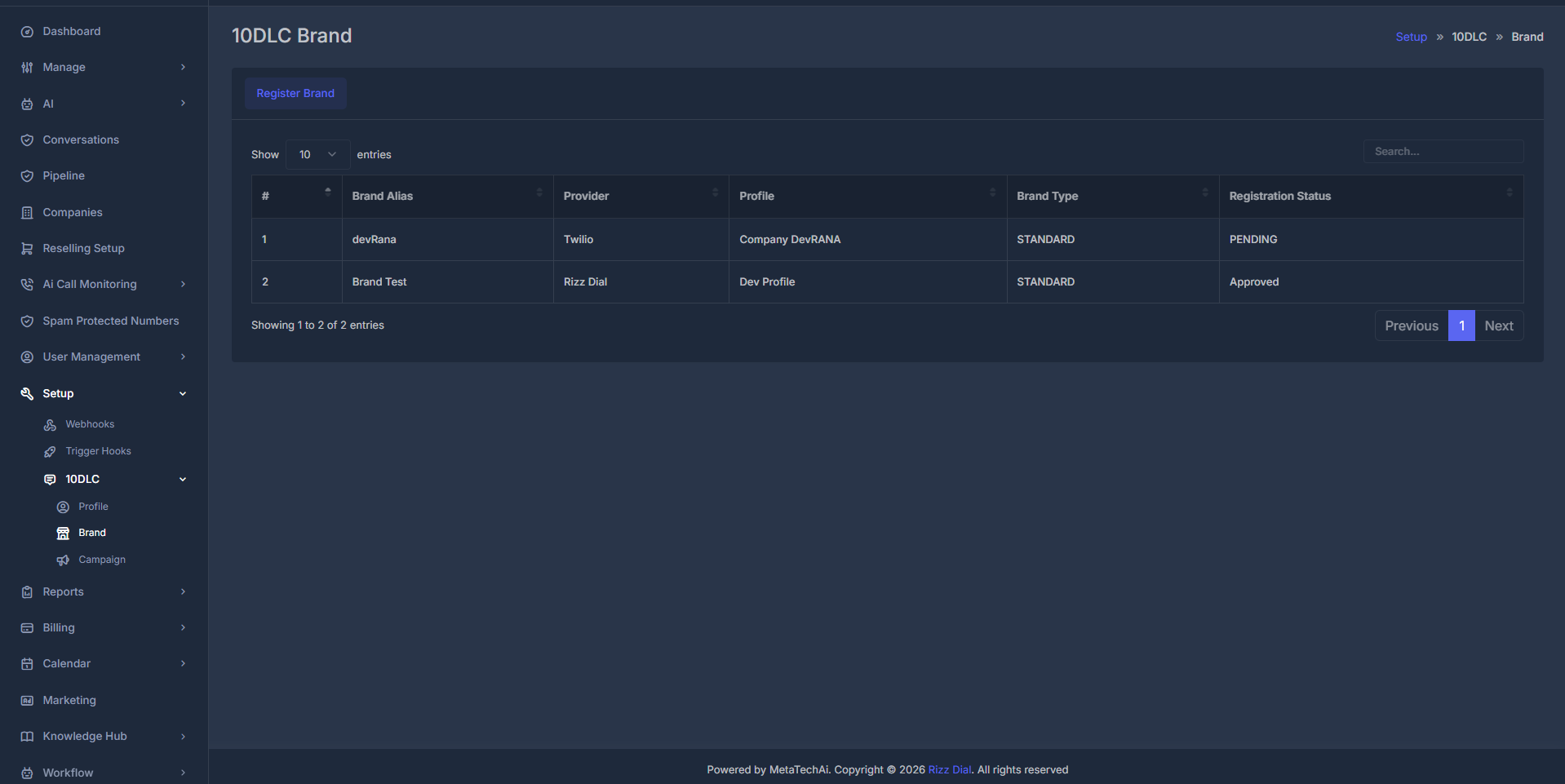
Establish your business identity for compliant Application-to-Person (A2P) messaging by registering and managing your 10DLC brand with wireless carriers. The brand dashboard gives you a centralized interface to review and manage all your brands, as illustrated below.
### 📋 Brand Listing Table
The table lets you view, sort, and manage all registered brands. The columns you will find are:
| Column | Description | Example/Values |
| - | - | - |
| **Brand Alias** | Custom name you assign to your brand | GROWBRAND |
| **Provider** | Messaging provider associated with the brand | TWILIO |
| **Profile** | Linked 10DLC Profile or company registration | Company-Dawn459A |
| **Brand Type** | Brand level determined by profile/provider | STANDARD, PREMIUM, etc. |
| **Registration Status** | Current approval status | PENDING, PROCESSED, APPROVED |
Register a new brand quickly via the “Register Brand” button — guided process ensures speed and accuracy.
Instantly delete brands or update their status using the action buttons.
## ❓ What is a 10DLC Brand?
A 10DLC Brand is your business's verified digital identity within the messaging ecosystem. Think of it as your "business license" for professional SMS messaging. It represents:
Your legal company information, cross-verified with state business registries and federal databases
Carrier-verified reputation (0-100 scale) affecting message deliverability, sending volume limits, and filtering bypass
Regulatory standing ensuring adherence to TCPA, CAN-SPAM, and carrier-specific messaging guidelines
**Why Brand Registration Matters:** Unregistered messaging can result in 70%+ delivery failures, automatic spam filtering, and potential number blocking. Registered brands see 95%+ delivery rates and can send up to 100,000+ messages daily.
## 📝 Brand Registration Process
### ⚡ Quick Registration Form
The brand registration process has been streamlined to focus on essential information required for carrier approval. The simplified form reduces registration time while maintaining compliance requirements.
# 🏷️ 10DLC Brand Registration & Management
Establish your business identity for compliant Application-to-Person (A2P) messaging by registering and managing your 10DLC brand with wireless carriers. The brand dashboard gives you a centralized interface to review and manage all your brands, as illustrated below.
### 📋 Brand Listing Table
The table lets you view, sort, and manage all registered brands. The columns you will find are:
| Column | Description | Example/Values |
| - | - | - |
| **Brand Alias** | Custom name you assign to your brand | GROWBRAND |
| **Provider** | Messaging provider associated with the brand | TWILIO |
| **Profile** | Linked 10DLC Profile or company registration | Company-Dawn459A |
| **Brand Type** | Brand level determined by profile/provider | STANDARD, PREMIUM, etc. |
| **Registration Status** | Current approval status | PENDING, PROCESSED, APPROVED |
Register a new brand quickly via the “Register Brand” button — guided process ensures speed and accuracy.
Instantly delete brands or update their status using the action buttons.
## ❓ What is a 10DLC Brand?
A 10DLC Brand is your business's verified digital identity within the messaging ecosystem. Think of it as your "business license" for professional SMS messaging. It represents:
Your legal company information, cross-verified with state business registries and federal databases
Carrier-verified reputation (0-100 scale) affecting message deliverability, sending volume limits, and filtering bypass
Regulatory standing ensuring adherence to TCPA, CAN-SPAM, and carrier-specific messaging guidelines
**Why Brand Registration Matters:** Unregistered messaging can result in 70%+ delivery failures, automatic spam filtering, and potential number blocking. Registered brands see 95%+ delivery rates and can send up to 100,000+ messages daily.
## 📝 Brand Registration Process
### ⚡ Quick Registration Form
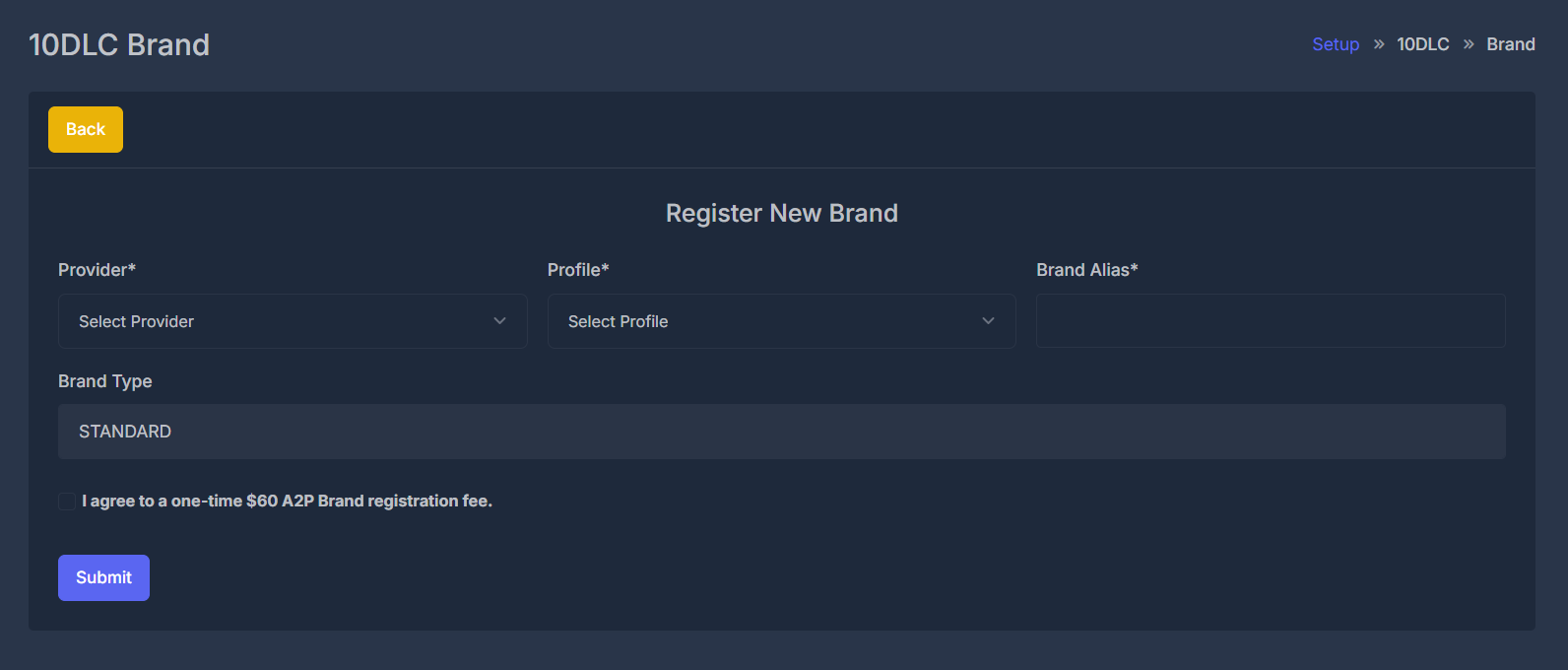
The brand registration process has been streamlined to focus on essential information required for carrier approval. The simplified form reduces registration time while maintaining compliance requirements.
 | Field | Description | Requirements | Impact |
| - | - | - | - |
| **Provider**\* | Select your messaging provider | Required, choose from supported list | Determines routing and approval workflow |
| **Profile**\* | Link to approved 10DLC Profile | Required, select from available | Sets business verification and eligibility |
| **Brand Alias**\* | Unique brand identifier | Required, unique, 2–50 characters | Used for identification and reporting |
| **Brand Type** | Brand classification (read-only) | Auto-populated from profile/provider | Affects messaging features and throughput |
**All fields marked with (\*) are mandatory and must be completed to enable form submission. Real-time validation prevents errors before you submit.**
**Important:** "Brand Type" is automatically determined by your selected profile and provider. If no profiles are available, first create one at [Setup → 10DLC → Profile](/setup/10dlc/profile).
### ▶️ Registration Steps
Select your messaging provider and an approved 10DLC profile. These choices determine how your brand is routed and which brand types are available.
* Choose from supported SMS providers
| Field | Description | Requirements | Impact |
| - | - | - | - |
| **Provider**\* | Select your messaging provider | Required, choose from supported list | Determines routing and approval workflow |
| **Profile**\* | Link to approved 10DLC Profile | Required, select from available | Sets business verification and eligibility |
| **Brand Alias**\* | Unique brand identifier | Required, unique, 2–50 characters | Used for identification and reporting |
| **Brand Type** | Brand classification (read-only) | Auto-populated from profile/provider | Affects messaging features and throughput |
**All fields marked with (\*) are mandatory and must be completed to enable form submission. Real-time validation prevents errors before you submit.**
**Important:** "Brand Type" is automatically determined by your selected profile and provider. If no profiles are available, first create one at [Setup → 10DLC → Profile](/setup/10dlc/profile).
### ▶️ Registration Steps
Select your messaging provider and an approved 10DLC profile. These choices determine how your brand is routed and which brand types are available.
* Choose from supported SMS providers
* Ensures correct carrier routing
* Required for approval by downstream networks
* Business and contact info fully verified
* Address confirmed and compliant
* Profile must be in "Approved" status
If you do not see your desired profile, create one under [Setup → 10DLC → Profile](/setup/10dlc/profile).
Choose your Brand Alias (public brand identifier):
| Requirement | Description | Example |
| - | - | - |
| **Length** | 2-50 characters | `MyCompany` |
| **Uniqueness** | Cannot duplicate an existing brand | `Acme2024` |
| **Characters** | Letters, numbers, spaces, hyphens allowed | `Acme-Tech LLC` |
| **Permanent** | Cannot change after registration | |
* Use your full company name or common abbreviation
* Avoid unsupported characters or emoji
* Be clear, professional, and recognizable for end users
Brand Alias is permanent after submission and cannot be edited later.
Review your selections. "Brand Type" is read-only and set automatically.
**Before submitting, the system will verify:**
* All required fields are filled
* Brand alias is unique to your account
* Profile is in "Approved" status
* Necessary business info is complete
* Form cannot be submitted until all validations pass
* After clicking Submit, your application enters the carrier queue
* Status updates and notifications are sent in real time
If you see "Please fill required fields!" double-check the Brand Alias, Provider, and Profile selections before submitting.
A successful registration appears instantly in your brand list, with status "Processing" until carrier review is complete.
This documentation is built and hosted on [Mintlify](https://mintlify.com), a developer documentation platform.